
Ad Account Manager Facebook: A Practical Day-to-Day Guide
Learn how an ad account manager facebook workflow actually runs — roles, access, campaign structure, budgets, and the fixes that keep delivery clean.
You open Ads Manager with several client accounts waiting, a campaign pacing ahead of plan, and a creative that has stopped bringing in quality conversions. A junior buyer has drafted a replacement, while an AI agent has flagged a budget change. The hard part isn’t finding the right screen. It’s knowing who can make each change, what needs approval, and how to prove what happened afterward.
That discipline matters at Meta’s scale. Meta reported $164.50 billion in 2024 revenue, while ad impressions across its Family of Apps increased 11% year over year (Meta’s 2024 annual report). For the person responsible for a Facebook ad account, more inventory and audience scale mean more decisions about pacing, structure, and records. This is an operating playbook for keeping those decisions controlled, especially when multiple clients, teammates, or AI tools touch live campaigns.
Table of Contents
- A Day in the Life of a Facebook Ad Account Manager
- Setting Up Roles and Access the Right Way
- Building a Clean Campaign, Ad Set, and Ad Structure
- Daily and Weekly Tasks That Keep Delivery Clean
- Editing Budgets and Bids as a Controlled Experiment
- Reconciling Access and Offboarding People Without Regrets
- Putting It All Together a Repeatable Workflow
A Day in the Life of a Facebook Ad Account Manager
The first pass through an account isn’t a tour of every tab. It’s a triage. Check whether spend is pacing as expected, whether delivery has stalled, and whether a change made yesterday has produced a clear problem. Then look at the creative and conversion quality before reaching for the budget controls.
A campaign can spend normally and still be in trouble. For example, the ad may be attracting clicks that don’t turn into valuable actions. If you judge it by CTR alone, you can miss a rising CPA or weak purchase value. Start with the business outcome, then use delivery and engagement metrics to help locate the cause.
The next question is operational: who else can act on this account? A teammate may be reviewing performance, a client may be approving a new offer, and an automation may be preparing changes. Those activities need clear boundaries. A drafted edit isn’t the same as an approved edit, and an account connection doesn’t automatically mean a tool should be allowed to change live spend.
Working rule: Diagnose first, decide second, and make the change only when you can name the reason and the guardrail.
The day also includes recording what changed, not just what the dashboard currently shows. When performance shifts after an edit, a reliable activity record helps distinguish cause from coincidence and makes rollback less guesswork.
For a useful orientation to the platform’s working areas, this Facebook Ads Manager guide for startups from CrowdTamers can help newer operators get familiar with the interface. The job of an ad account manager, though, extends beyond navigation. It’s the daily practice of matching access, structure, and controlled changes to the client’s goals.
Setting Up Roles and Access the Right Way
Access should follow responsibility, not convenience. Giving every teammate Admin rights may seem faster, but it makes it harder to limit accidental changes and keep ownership clear. Set up each person or tool with the permissions it needs, then record who approved the access and which assets it covers.
Separate account access from business access
Meta access can involve the ad account itself, Business Portfolio permissions, or a partner relationship. These aren’t interchangeable. Someone might have access through a business-level assignment or partner connection even if you remove their direct ad account role, so check the route by which access was granted.
Use a named Meta login for each person. Avoid shared inbox credentials, which blur who performed an action. Require two-factor authentication for users, and keep a record of the account owner, the person receiving access, the asset, the role, and the approval.
A practical starting structure is:
- Client owner: Retains Admin responsibility for the business and its assets.
- Agency operator: Gets the level of access needed to build and manage campaigns, without broader business control unless the work requires it.
- Analyst: Receives read access when the role is reporting and diagnosis rather than editing.
- AI tool: Starts with read-only access. Enable write actions only after defining approvals, limits, and an accountable human owner.
Meta’s developer documentation makes the distinction especially important: the ads_management permission can both read and manage an ad account (Meta permissions documentation). Treat “connected” and “authorized to change campaigns” as different decisions. For AI-assisted work, define which actions need approval, set spending boundaries, and make new campaigns start paused until a person reviews them.
Grant access deliberately
Before inviting someone, confirm which business, ad account, Page, and related assets they need. Send the invitation to their individual account, select only the relevant assets, assign the appropriate role, and check that they’ve completed the required security setup. Record the approval and review date in the same place you track account ownership.
If a client is setting up a new business presence, this revenue-focused Facebook account creation guide from The Advertising Suite offers related setup context. Keep the principle simple: grant the least access that lets someone do their assigned work, and verify that access after the invitation is accepted.
Building a Clean Campaign, Ad Set, and Ad Structure
Structure problems rarely come from bad creative. They come from ad sets that were duplicated, renamed, and edited until nobody can say why each one exists. The hierarchy itself is simple: campaign → ad set → ad. The campaign holds the objective, the ad set holds audience, budget, placements, and optimization event, and the ad holds the creative. Mixing different strategic jobs into one level makes it hard to tell which decision moved the result.
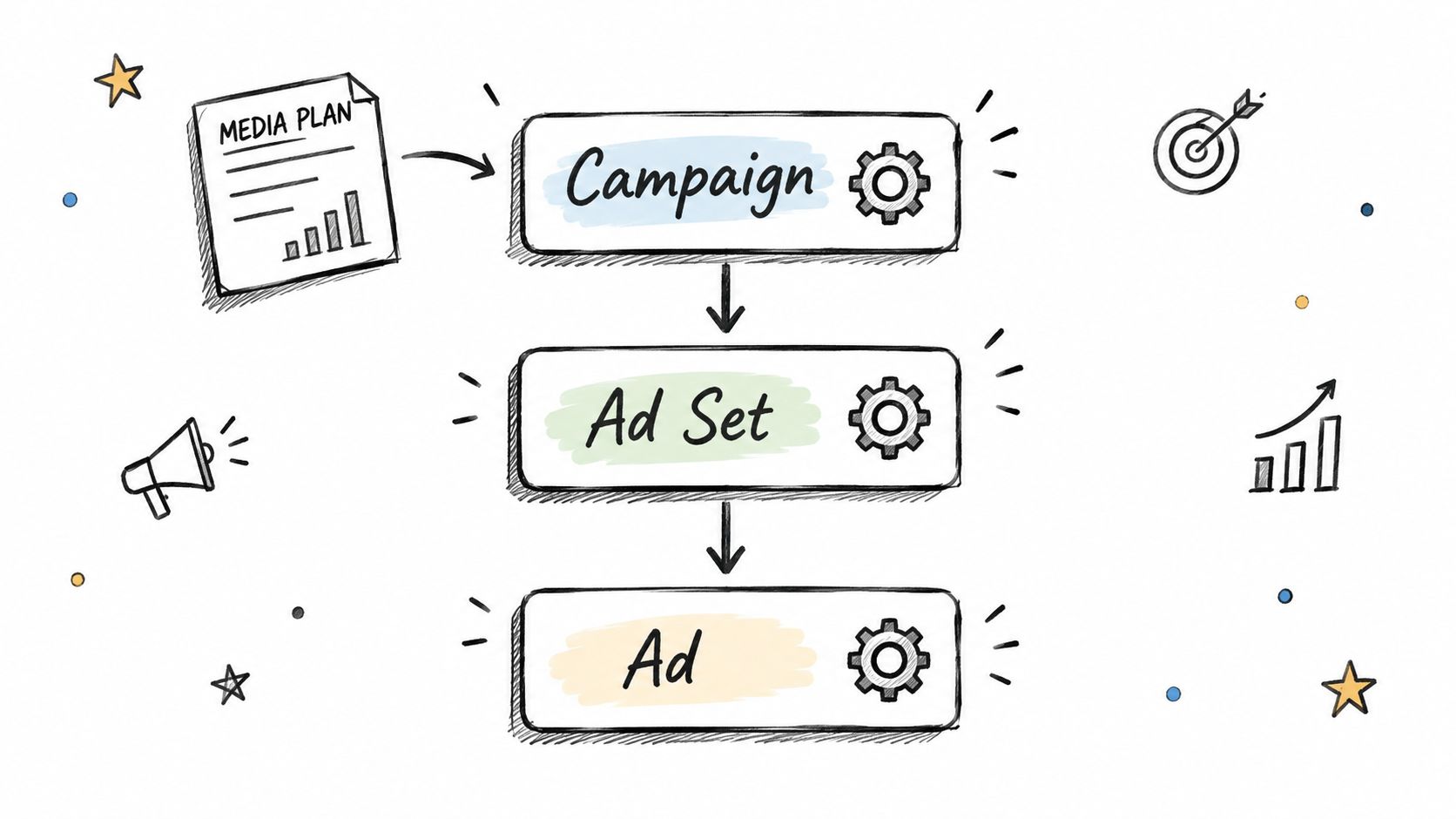
Build from the media plan first. Map each distinct objective to a campaign before you touch Ads Manager, and name every entity so it encodes its market, audience, and funnel role. An auditor should be able to read the account without opening a single ad set. If you are deciding which objective belongs at the top of the structure, this guide to the objective of a campaign can help clarify the choice.
Before you split an ad set, ask what is genuinely different: audience, market, offer, optimization event, or funnel role. Every new ad set starts its own learning process, so unnecessary splits leave each part with too little conversion signal to optimize against. As a working example, an account spending a few thousand euros a month that keeps 15 or more campaigns active is usually spread too thin. Treat a high campaign count as a structural warning rather than a hard cap.
Suppose an audit finds several ad sets sharing the same objective, conversion event, market, offer, and funnel role. Consolidation is the default fix. Merging them concentrates their signal and simplifies reporting, while near-duplicates left running keep competing for the same users. Keep separate ad sets only when the distinction changes how you interpret performance or manage delivery.
| Signal | Merge into one ad set | Split into separate ad sets |
|---|---|---|
| Objective and optimization event | They match | They differ |
| Market and offer | They’re the same | They require distinct delivery or reporting |
| Audience | The groups substantially overlap | The groups represent meaningfully different strategies |
| Funnel role | The ads serve the same job | One serves a different stage or outcome |
Handle structural changes the way disciplined teams handle budget edits: rarely, and for a stated reason. Duplicating an ad set to “see what happens” is the most common way clean accounts decay, because each copy splits the signal and adds one more entity someone has to justify in the next audit. When a build does need to happen, this short walkthrough clicks through constructing the campaign → ad set → ad hierarchy inside Ads Manager, showing where the objective, audience, and creative settings sit:
Daily and Weekly Tasks That Keep Delivery Clean
Daily work is mostly about spotting exceptions, not finding reasons to edit something. Review pacing across accounts, check delivery and conversion quality, and look at whether the current creative is still doing its job. When a campaign is off track, identify the likely cause before changing audience, bid, budget, and creative all at once.
A simple rhythm keeps the work focused:
- Daily: Check spend, delivery, and the business outcomes that matter. Flag unusual movement for investigation rather than reacting to every fluctuation.
- After an edit: Record who made the change, when, the affected entity, the old and new values, the reason, and the eventual outcome.
- Weekly: Review structure, creative performance, overlap, and whether budget allocation still reflects current priorities.
- After a reporting window closes: Judge the effect of a change against the baseline. Don’t call an edit a winner or loser while its results are still incomplete.
The edit log is part of the operating system, not clerical cleanup. Without it, the team may know what the account looks like now but not why it got there. That becomes a serious problem when a client asks who changed a budget or an operator needs to reverse a mistaken edit.
New campaigns should arrive paused, deletions should be off the table, and every action should leave a durable record.
That safety pattern works for people and AI agents alike. It preserves speed for drafting and preparation while keeping the final move under control. A useful playbook for evaluating and improving delivery is the Sprints & Sneakers Facebook ads optimization guide; use any optimization advice in the context of your account’s objective, conversion quality, and reporting window.
For more on routine campaign maintenance, this guide to optimising Facebook ads is a useful companion. Keep the actual cadence grounded in evidence: inspect daily, review structure regularly, and make conclusions only after the data needed to judge the change has arrived.
Editing Budgets and Bids as a Controlled Experiment
Budget and bid edits are among the easiest ways to make a live account harder to interpret. An operator raises a budget on Tuesday, sees a weak Wednesday, pulls it back, and by Friday nobody can tell what the account was responding to. Start with economic guardrails instead of a hunch: the break-even CPA or ROAS, the minimum conversion volume that makes a decision meaningful, the daily variance you can tolerate, and the maximum budget change you’ll permit at once.
Then run every edit as a repeatable test:
- Record the baseline. Capture spend, conversions, marginal CPA, delivery, and profit before changing anything.
- Change one variable. Budget, audience, creative, and bid controls stay separate.
- Wait through a complete reporting window. Compare results against the baseline after the window closes.
- Keep or roll back. If the change breaches a guardrail, reverse it and record why.
The optimization-event benchmark for learning stability covered earlier applies directly here: delivery stays noisy while the system estimates which users and contexts are likely to convert. Judging a change inside that window often turns normal learning variation into an unnecessary reset.
When results disappoint, inspect the evidence before touching targeting. Break performance down by country, placement, demographics, and creative asset. If one creative is drawing attention but producing poor downstream outcomes, new targeting just delivers the same weak message to a different group.
Troubleshooting: Underdelivery may follow an overly aggressive cost target. Fragmented ad sets can limit useful signal. A high CPM isn’t automatically a reason to pause if conversion quality and profit remain acceptable.
Scale budgets gradually and write down the rollback condition before you touch anything. The trade-off is real: slower, sequenced edits cost a few days of delivery speed but leave the account diagnosable. A run of reactive edits saves hours and costs weeks of interpretation.
Reconciling Access and Offboarding People Without Regrets
Access accumulates. A former contractor may still have an account role, a partner invitation may remain open, or someone may retain Business Portfolio access after a direct ad account assignment is removed. Treat each as a separate permission path to check, not as one access switch.
Run a recurring reconciliation using an inventory that covers every relevant account and asset:
- List the assets: Ad accounts, Pages, pixels, catalogs, billing records, and partner relationships.
- Map people to work: For each named user, record the access required for their current responsibilities.
- Flag exceptions: Include stale users, excessive Admins, unmatched assignments, and unresolved invitations.
- Get approval and remediate: Ask the client to confirm exceptions, then revoke or downgrade access as appropriate.
- Preserve evidence: Record the finding, owner, action taken, and remediation date.
Use named accounts rather than shared inbox logins. When a working relationship ends, revoke access that day, then verify the person no longer has an alternate business-level or partner route. Removing an individual assignment doesn’t prove that all access has ended.
A structured ad account management tools overview can help teams think through how they track access and operational records across accounts. Whatever system you use, keep the audit trail with the finding so the next reviewer can see what was checked and what changed. Access review isn’t a one-time onboarding task. It’s part of managing the account safely.
Putting It All Together a Repeatable Workflow
Start with the business objective and guardrails. Assign named users the least access they need, build a campaign structure that reflects real strategic differences, and keep creations paused until they’ve been reviewed. Check pacing and outcomes regularly, log every edit, and treat each budget change as a test with a baseline and rollback rule.
Use this quick audit before making or approving changes:
- Access: Is every user or tool named, necessary, and approved?
- Structure: Does each campaign and ad set have a distinct role?
- Changes: Are new entities paused, with no hard deletes and a permanent activity record?
- Ownership: Does every open finding have a named person responsible for it?
- Review: Is access reconciliation on the calendar?
AI agents can speed up account work, but they also make action-level controls more important. Teams that pair clear approvals with reliable records can move quickly without losing track of who changed what.
AdCrunch connects Meta, TikTok, and Google Ads accounts to tools such as Claude, ChatGPT, and Cursor, with Meta campaign actions starting paused and changes recorded in an activity log. If your team needs a more controlled way to manage work across advertising accounts, visit AdCrunch.