
TikTok Ads Manager: How to Build and Measure Campaigns
Learn how to use TikTok Ads Manager: set up campaigns, check pixel events, pick attribution windows and test creatives without wasting spend.
You’ve got one TikTok campaign showing strong ROAS, another that looks weak, and a client asking you to move the budget before the weekend. The numbers in TikTok Ads Manager are clear enough. What isn’t clear is whether TikTok caused those sales, or whether it just claimed credit for people who’d have bought anyway.
That’s the trap I’d avoid. Build the account cleanly, fix tracking before you optimize, and treat platform ROAS as a signal you check, not a decision you obey. The setup work takes a little longer. It saves you from scaling the wrong thing.
Table of Contents
- Campaign, Ad Group and Ad Levels at a Glance
- Set Up the Account and Access
- Set Up Event Tracking Before You Optimize
- Choose the Objective and Launch the Campaign
- Test Creatives Without Mixing Variables
- Optimise Delivery and Run Several Accounts
- Verify Attribution and Incrementality Before Moving Budget
Campaign, Ad Group and Ad Levels at a Glance
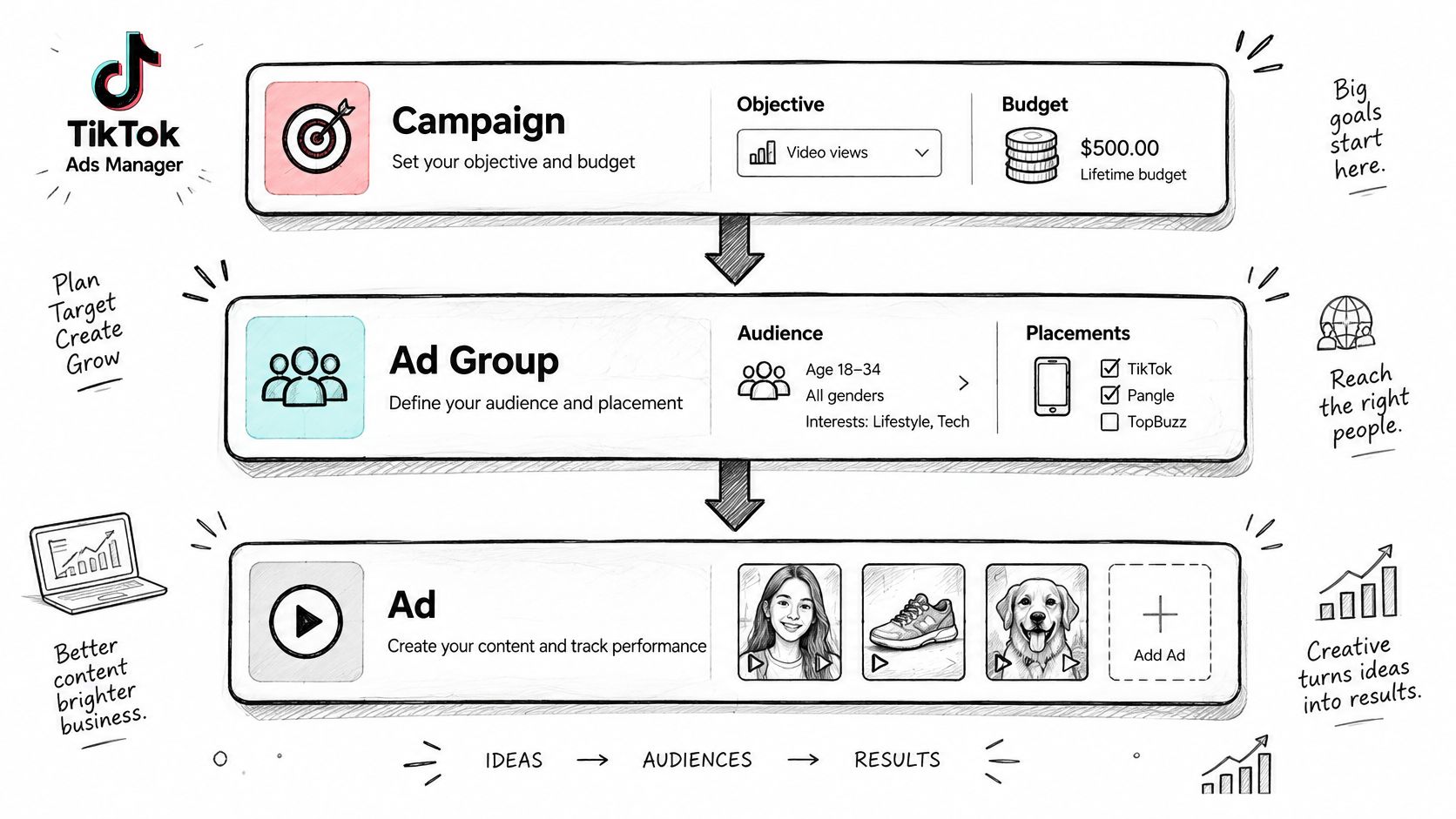
Most setup mistakes happen at the wrong level. You change a budget expecting delivery to change, or you look for an audience setting inside an ad and can’t find it. The TikTok campaign setup guide describes a three-level structure of campaigns, ad groups, and ads, and TikTok documented this objective-based structure in its 2021 campaign guidance.
The picture below shows how the three levels nest inside each other.
What Each Level Actually Holds
The campaign holds your advertising objective and overall budget. TikTok groups objectives into awareness, consideration, and conversion, covering recognition and ad recall at the top, actions such as website visits, app installs, video views, or leads in the middle, and purchases or registrations at the bottom.
Ad groups hold the delivery controls. That’s where audience, placement, schedule, optimization goal, and bid live. The ad itself only holds the creative asset users see. Budget can sit at campaign or ad group level, as a daily budget, a lifetime budget, or with no campaign-level limit, depending on setup.
| Level | What you control | Set it here for | Example |
|---|---|---|---|
| Campaign | Advertising objective and overall budget | The business goal | Purchases for one product line |
| Ad group | Audience, placement, schedule, optimization goal and bid | How delivery is controlled | One market and one audience definition |
| Ad | Creative assets shown to users | Which creative is being tested | One short video with a clear hook in the first seconds |
You’ve also got three buying workflows. Manual campaigns give you direct control. Search campaigns place ads in TikTok search results. Smart+ campaigns use automation for performance-focused setup and optimization.
Before you build: List every setting you plan to change and mark the level it belongs to. If you can’t place it, don’t open the builder yet.
This split matters more with several accounts. A campaign defines the business goal, ad groups control delivery, and ads show which creative you’re testing. Read results at the level where the change was made, or you’ll blame the creative for an audience problem.
Set Up the Account and Access
Confirm each ad account sits under the right business profile first, and give each operator a role that matches their job. Edits stay traceable that way, and nobody works in accounts they don’t manage.
Five Checks Before Any Spend
- One pixel per property: Create one pixel per website or app and name it by market, so events from different stores never mix in one data source.
- Currency and time zone: Set both deliberately for each ad account before launch, because budget resets and reporting dates follow them. Mismatched time zones make cross-market comparisons wrong.
- One naming convention: Use a pattern such as market_objective_audience_date_creativeID for accounts, campaigns, ad groups, and ads, and apply it from the first launch.
- A shared account register: Record owner, market, pixel ID, currency, time zone, and billing contact for each account, so a new operator can take over without guessing.
- Alert contacts: Name someone for disapprovals and billing failures, so spend problems reach a person the same day.
Your final check is simple. Every account in the register should be reachable from one reporting view, using the same naming and time zone rules. If it isn’t, fix the register now. It’s much harder once three markets are spending.
Set Up Event Tracking Before You Optimize
If your events are wrong, the algorithm learns the wrong thing. It’ll find more of whatever your broken setup reports, and you’ll pay for that learning. I’d build measurement first, even if it delays launch by a few days.
The TikTok Events API getting started guide recommends combining TikTok Pixel with Events API to improve event coverage, measurement, optimization, and targeting, and sending at least three events spanning upper, middle, and lower funnel activity. If you’re weighing how to route server events, a conversions API gateway is one way to manage that connection without hand building every piece.
Build It in Six Stages
- Agree the schema: Define funnel events, parameters, and match keys with legal and engineering before anyone writes code.
- Deploy both channels: Install the Pixel and Events API together, not one as a replacement for the other.
- Set deduplication: Configure it so browser and server events aren’t counted twice. Skip this and you’ll inflate conversions and distort CPA and ROAS.
- Send consistent events: Use the same names across the funnel, such as ViewContent, AddToCart, InitiateCheckout, and CompletePayment.
- Pass value and currency: Include purchase value and currency so value-based optimization has something real to work with.
- Validate diagnostics: Check event diagnostics before you optimize anything.
The second pitfall is optimizing to Purchase before you’ve got enough lower funnel signal. A staged hierarchy gives the system usable learning data earlier while you build toward value optimization.
Advanced Matching and first-party cookies can improve matching across browsers, devices, and multiple sessions. They’re worth setting up, but they don’t fix a messy schema.
Fire one test purchase and confirm it appears once, with the right value and currency. If it shows twice or without value, you’re not ready to optimize.
Choose the Objective and Launch the Campaign
Start with the objective, because it decides what the system optimizes toward. Don’t accept the default. Choose it from the business goal, then check whether your tracking can support it.
| Objective group | Goal it serves | Example objectives | Use it when |
|---|---|---|---|
| Awareness | Recognition and ad recall | Reach, brand awareness | A new product or market needs visibility |
| Consideration | Actions before purchase | Website visits, app installs, video views, lead generation | Warm audiences need a next step |
| Conversion | Purchases or registrations | Website conversions, app events | Purchase events are recorded reliably |
If the pixel doesn’t yet record lower funnel events reliably, run a consideration objective first. That gives the system signal to learn from while you fix the deeper events. Jumping straight to conversion with thin data usually looks like a targeting problem when it’s really a measurement problem.
Launch in Seven Steps
- Name the campaign properly: Include market, objective, and date. Generic names make multi-account reporting useless within a month.
- Choose the buying workflow: Pick manual, Search, or Smart+ based on how much control you need. Smart+ needs a stable conversion signal to perform well, so I’d use manual or Search until that signal exists.
- Set the budget at the right level: Choose the budget type and amount, then confirm which level holds the limit before you launch. That’s where spend will stop.
- Build the ad group: Set audience, placement, schedule, optimization goal, and bid, changing one setting at a time. The common slip is an optimization goal that doesn’t match the event you’re recording.
- Upload one to three creatives: Give each one a clear hook and one offer. More than that at launch and you won’t learn which element did the work.
- Preview every placement: Check each ad where it’ll appear and confirm nothing is flagged, cropped badly, or pointing to the wrong page.
- Review, launch, and log the time: Read every line once more, publish, and record the launch time. Attribution reviews depend on knowing exactly when delivery started.
Say you’re launching a skincare product in a new market. You’d start with awareness or consideration while the pixel builds history, keep one audience per ad group, and test two hooks against the same offer. That’s a clean read. Launching five audiences and six videos on day one gives you spend, not answers.
A healthy first day shows delivery started, ads approved, and the first events arriving. It doesn’t need to show profit yet.
Check those three things and leave the settings alone. If delivery hasn’t started, look at approval status, schedule, and budget level before you touch the bid. Most day one problems are setup problems, not auction problems.
Test Creatives Without Mixing Variables
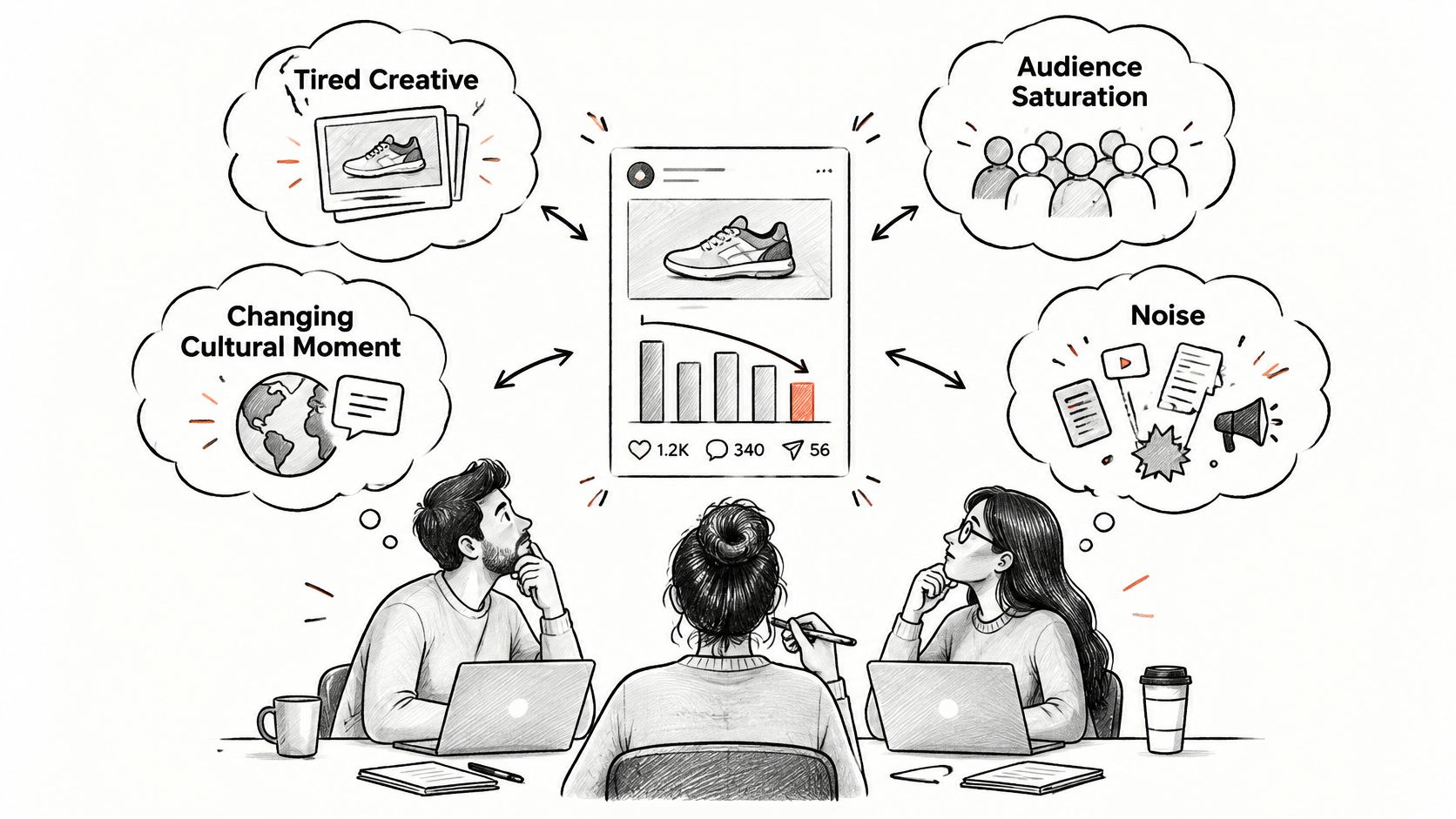
When performance drops, you need to know why. Is the creative tired, the audience saturated, the cultural moment gone, or is it just noise? Swapping the whole ad every time tells you nothing.
The image below captures the usual moment, a team staring at declining results and guessing at the cause.
The rule is simple. Change one major creative variable at a time and keep audience and optimization settings fixed. Marketer research in HubSpot’s TikTok marketing report found 30% of social media marketers planned to increase TikTok investment in 2025, so more spend and faster production will make this discipline harder, not less important.
What to Track for Every Ad
- Creative concept and hook: The idea and the opening seconds that earn attention.
- Proof mechanism: How the ad makes the claim believable, a demo, a result, a comparison, or a creator’s word.
- Creator identity and format: Who’s on screen and how the video is structured.
- Landing page promise: Whether the page delivers exactly what the video offered.
- Fatigue indicators: Falling click-through rate with rising cost per result.
| Symptom | Likely cause | Next action |
|---|---|---|
| Falling click-through rate with rising cost per result | Creative fatigue | Refresh the creative and keep the audience fixed |
| Stable click-through rate with falling conversions after a spend rise | Audience saturation | Widen or rotate the audience and keep the creative fixed |
| Past hooks now flat and references feel dated | Cultural relevance shift | Test a new hook and format in the same audience |
| Swings only inside the predeclared window | Noise | Hold the test until the window matures |
Decide the evaluation window before launch and stick to it. Judging on daily swings turns every test into a reaction. For teams producing variants quickly, it helps to understand the full path from ad brief to published clip, so production speed doesn’t outrun your logging.
The short video below works through creative testing choices you can compare against your own taxonomy.
Watch out for AI-generated sameness. More output doesn’t mean more ideas, and native-feeling authenticity often beats polished output. Keep a shared sheet with columns for concept, hook, creator, format, market, launch date, reason, and result. Log every launch, pause, and replacement with why it happened.
Learnings then transfer across markets, without assuming a winner in one language or culture works in another. The best testing programme may maximize your learning rate, not the lowest reported CPA this week.
Optimise Delivery and Run Several Accounts
Protect the learning phase before you chase results. Avoid large budget or bid changes while a campaign is still learning, and scale in agreed steps rather than jumps. Change one setting per ad group per review, then wait for your predeclared window before judging it.
Set pause rules in advance. For example, pause an ad once its cost per result stays above the agreed ceiling for the full window. Nobody should make that call on a bad afternoon.
A Weekly Routine That Scales
- Same checklist per account: Spend pacing, disapprovals, event delivery, creative fatigue, and budget moves, reviewed in a fixed weekly slot.
- One change log: Record date, account, level changed, author, reason, and result for every edit.
- An approver threshold: Require sign off for any budget increase above the agreed limit.
- Shared taxonomy: Use the same naming and creative labels so every operator reads results the same way.
If you’re restructuring how several accounts are run, multi-account management covers the operating patterns in more depth. When a winning video needs cutting down for another placement or market, you can find AI tools for video repurposing to speed up the edit work without losing the original hook.
Before copying a winning setup to another market, check language, product fit, and cultural relevance. Treat the copy as a new test with its own window. It isn’t a proven winner until it proves itself there.
Verify Attribution and Incrementality Before Moving Budget
Lock your attribution window for the whole test before comparing anything. The window changes your reported numbers before any ad does. The TikTok attribution overview documents that web campaigns using Advanced Matching default to 7 days post-click and 1 day post-view, while the standard window without Advanced Matching is 1 day post-click.
| Setup | Click-through | View-through | Engaged view-through |
|---|---|---|---|
| Web campaign with Advanced Matching | 7 days post-click | 1 day post-view | Credited after 6 seconds watched with no click, within the set window |
| Web campaign without Advanced Matching | 1 day post-click | No post-view credit in the standard window | Credited after 6 seconds watched with no click, confirm the window set in the account |
Engaged view-through credits a conversion after a user watches at least six seconds without clicking. That’s useful signal. It isn’t the same as a click, and it shouldn’t be reported as if it were.
The Check I’d Run Before Moving Money
- Choose a primary window that matches your normal purchase cycle.
- Record click, view, and engaged-view conversions separately so you can see what kind of credit you’re getting.
- Compare against an independent source, your analytics or CRM, not just another platform dashboard.
- Inspect time to conversion and touchpoint paths to see whether TikTok starts journeys or closes them.
- Judge only after the window matures, so delayed conversions have arrived before you decide.
TikTok Ads Manager supports this work better than people credit it for. The TikTok Ads Manager introduction identifies six tool areas, Events, Creatives, Audiences, Catalogs, Comments, and Instant Pages, alongside custom reports, predefined templates, and scheduled report delivery, and TikTok’s April 2022 Ads Manager page described it as an all-in-one system for creating, launching, and optimizing campaigns. Knowing which ad performance metrics to pull into those reports keeps the review focused.
Reported ROAS Is Not Proof of Cause
Now the harder question. Did TikTok cause the sale? TikTok’s 2025 measurement discussion cited in the DISQO state of ad measurement report found 35% of last-touch-attributed spend generated zero incremental sales, while 60% of underperforming marketers continued prioritizing last-touch measurement.
Platform reporting is siloed. You often lack full exposure, transaction, and cross-platform usage data in one place, so a view-through conversion can point the right way without proving incremental revenue. Short-form video also introduces demand that search or direct traffic later closes, which cuts both ways in the numbers.
Run a geo or audience holdout test where it’s feasible. For mature programmes, add media-mix or lift analysis. Move budget only when reported ROAS and the incrementality check agree. If they disagree, believe the holdout.
Improving reported ROAS can mean better attribution capture, not better advertising. Test for the difference before you scale.
Schedule one holdout for your next campaign cycle and write the decision rule before launch. Log every budget change with its author and result. In our own setup, every change the agent makes to a campaign, ad set, or ad appears on the Activity page with the ad account, what changed, who asked for it, and whether it worked, and AdCrunch reads performance data and account structure on Meta, TikTok, Google Ads, and OpenAI. Whatever tool you use, you need that trail when someone asks why the budget moved.
If you’re managing TikTok alongside other networks and you’re tired of moving budget on platform ROAS alone, AdCrunch lets you query live campaign performance and account structure across your connected accounts in one place, with every change logged. Connect your accounts, ask your first question, and check what TikTok is really delivering before your next budget move.