
Audit Trail Example: What Each Ad Change Record Shows
An audit trail example for ad operations: the account, requested change, who approved it, and the outcome, with a sample entry and how to read it.
Your client asks why spend rose overnight on the Summer Sale campaign. The dashboard shows the line bending upward. It shows the spend, the date and the shape of the curve, and nothing about who asked for the change, who approved it, or what the budget was before.
That gap is where an audit trail earns its place. An audit trail is a time-stamped record of what happened, who or what caused it, and how it ended. The useful version isn’t a longer activity feed. It’s a record you can hand to a client, a finance lead or a new account manager and let them rebuild one change without asking you a question.
What follows is a line-by-line walk through one audit trail example in the format AdCrunch’s Activity page produces: the row in the list, the fields in the detail panel, then every status a change can end with. Along the way, it marks the point where the record stops being proof and becomes an inference you have to state out loud.
Table of Contents
- A Sample Ad Operations Audit Trail Entry
- Rebuilding One AI Budget Change From the Detail Panel
- Reading Spend Changes Against Your Dashboard
- Every Status an Audit Trail Change Can End With
- Using the Trail in Disputes, Compliance and Postmortems
- Who Uses the Trail and What It Costs
A Sample Ad Operations Audit Trail Entry
One entry in an audit trail records five things: when a change happened, who asked for it, which ad account it touched, what changed, and how it ended. Everything else on the page is detail layered onto those five answers.
Here is the format the Activity list uses, with the bracketed parts standing in for names in a live account. It shows the shape of a record, not a client’s entry.
Nov 18, 14:32 · [team member] · [ad account] · Set daily budget $800.00 → $1,000.00 on campaign Summer Sale · Succeeded
The sketch below lays out the same fields as a hand-drawn table, which helps when you’re explaining the record to someone who has never seen one.
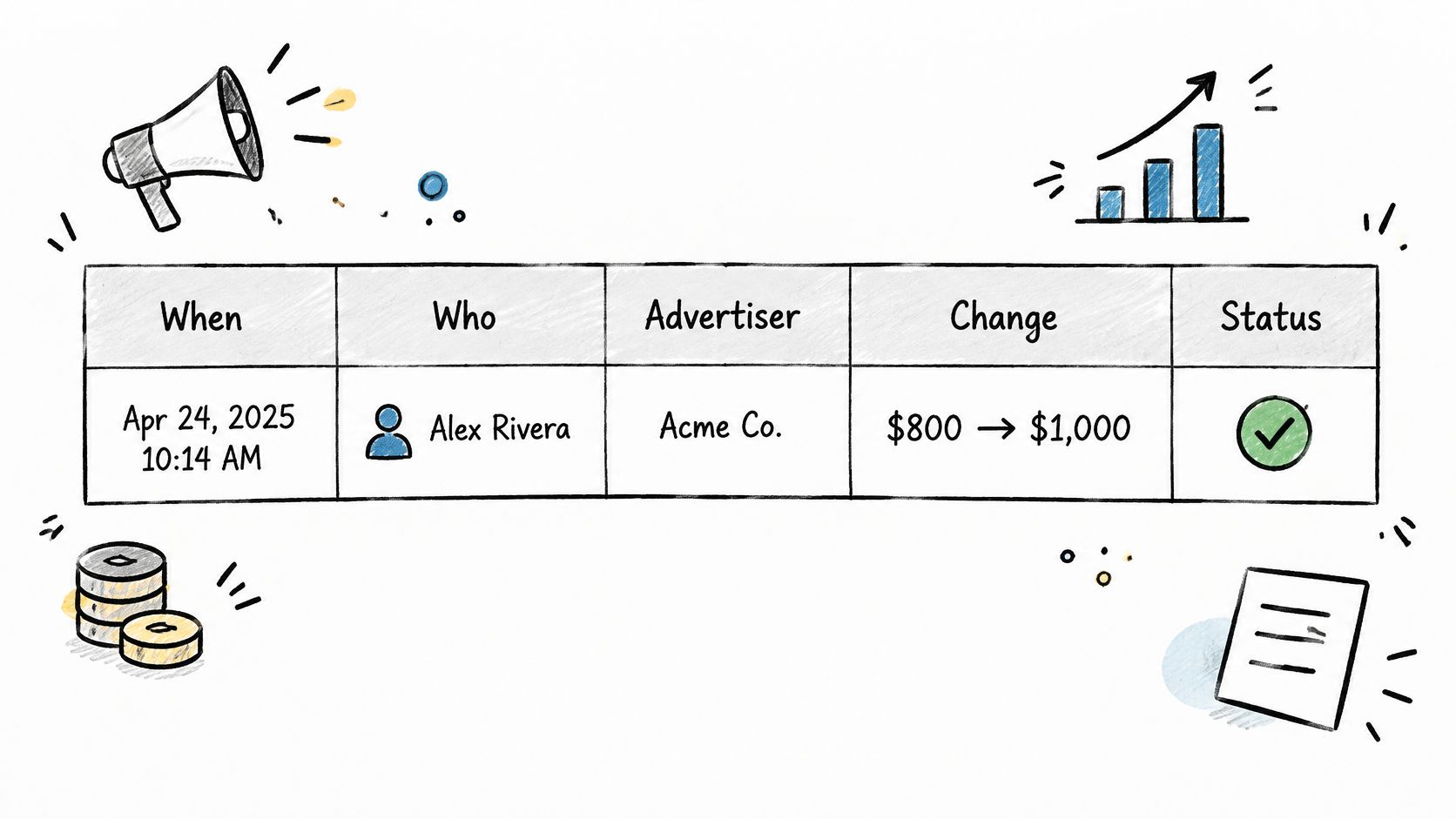
Columns in one audit trail row
| Column | What it holds | Example value |
|---|---|---|
| When | Date and time the change was requested | Nov 18, 14:32 |
| Who | Team member, or the AI client acting for a team member | [team member] |
| Advertiser | Ad account the change touched | [ad account] |
| Change | Exact requested change, with the old and new value | Set daily budget $800.00 → $1,000.00 on campaign Summer Sale |
| Status | How the change ended | Succeeded |
Four of those columns are self-explanatory. Change is the one worth slowing down on. The record keeps the value it replaced, not only the new amount, so it reads “$800.00 → $1,000.00” rather than “$1,000.00”. That single field is what answers “what did it replace” six weeks later.
The Who column can name a person or the AI client that acted for one. Claude, ChatGPT and the Adgent all produce changes on Meta, and the record names the team member the agent was working for.
Reviewers often want more than an activity feed gives. Change-management reviewers sample changes and request authorization, testing evidence, a rollback plan, and proof that the requester and the approver were different people, a practice SysAid’s change management guidance sets out. If you want the broader mechanics of how log records are structured and queried, audit log help covers that plumbing.
Reading rule: ask the five questions in order, When, Who, Advertiser, Change, Status. A row that can’t answer all five is incomplete, however tidy it looks.
Rebuilding One AI Budget Change From the Detail Panel
What does a budget-change record prove, and where does its evidence stop? A useful example is a request to raise a Meta campaign’s daily budget from $800.00 to $1,000.00. The Activity page records the ad account, the exact change, who asked for it, who confirmed it, and how it ended. Those fields let a reviewer reconstruct the recorded action without assuming the trail captures every decision or event around it.
The basic idea of an audit trail predates ad platforms. The U.S. National Institute of Standards and Technology described an audit trail as records of computer events, with fields for the event time, user ID, initiating program or command, and outcome, as NIST’s 1997 bulletin explains. For an ad operation, the account and the exact budget change make that record more useful to the people reviewing campaign activity.
| Field | Question it answers | Example value |
|---|---|---|
| Ad account | Which account did the change affect? | [ad account], Meta |
| Exact change | What value changed, and from what to what? | Daily budget: $800.00 → $1,000.00 |
| Asked by | Who requested the change? | Team member, or the AI client acting for them |
| Confirmed by | Who confirmed a change that starts spend or raises a budget? | Team member |
| Outcome | How did the change end? | Succeeded |
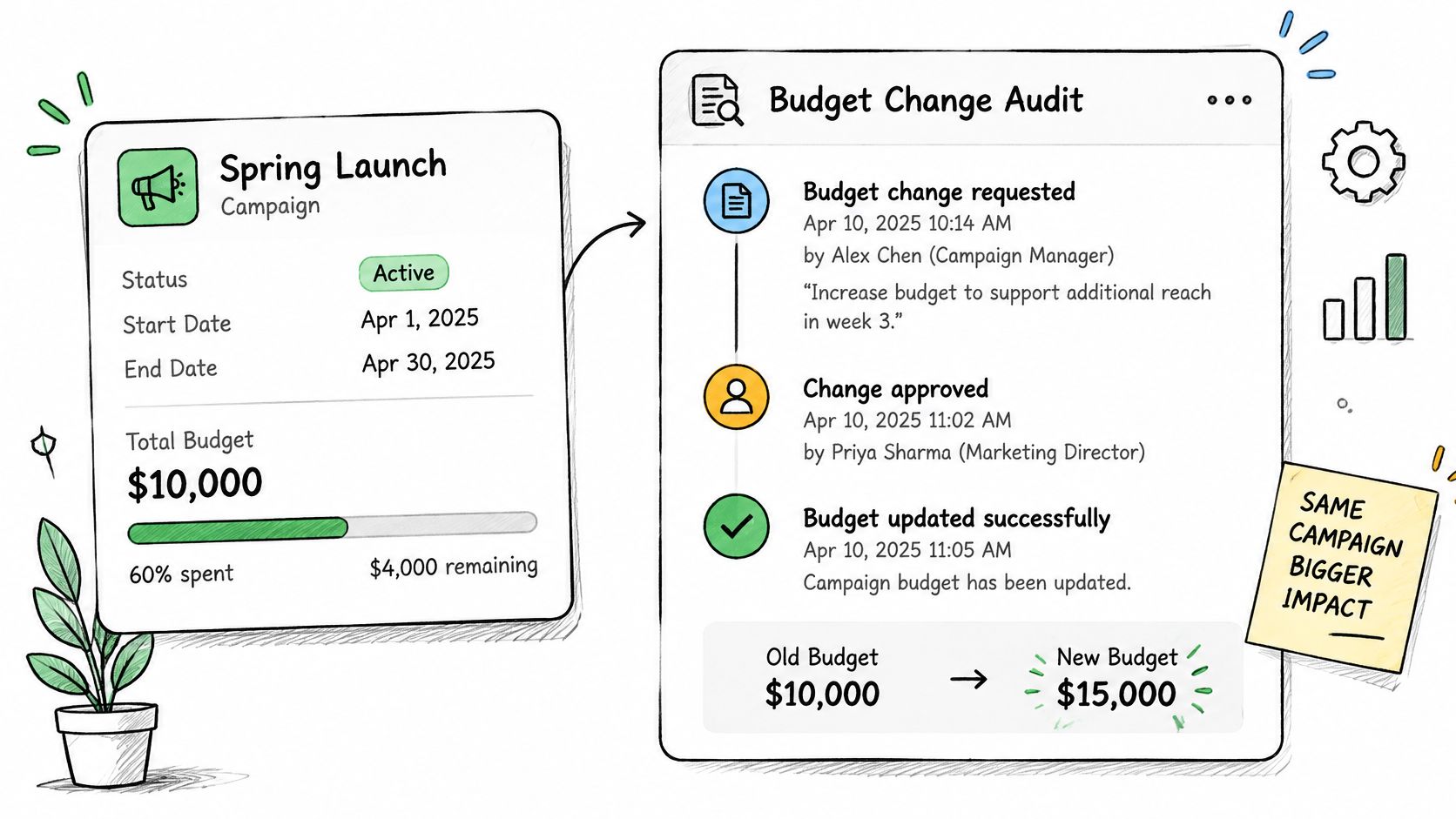
Five steps from request to outcome
- Request. A team member asks an agent to raise the campaign’s daily budget. The request records the person who asked and the exact change under review. A request is evidence of intent, not proof that Meta’s budget changed.
- Confirmation. For an agent change that raises a budget, a person confirms it in the console. The Activity page records who confirmed the change. That detail distinguishes the requester from the person who authorized the action.
- Change. The record identifies the ad account and the precise old and new values, such as $800.00 → $1,000.00. This is more informative than a line that says only “budget updated,” because it shows what the new amount replaced.
- Outcome. The Activity page records how the change ended. A successful outcome supports the claim that the requested action completed; a different outcome means the reviewer should not treat the request alone as proof of a completed budget increase.
- Comparison. Check the current budget in Ads Manager against the new value in the record. If they differ, the trail alone does not explain why. Pause before making another change, and investigate the account state and the sequence of events.
The object being changed matters. Meta organizes work into campaigns, ad sets and ads. A campaign contains ad sets, while an ad set groups ads and holds settings such as budget, schedule, bid information and targeting, as described in the Meta Marketing API reference. Naming the relevant object helps a reader distinguish a campaign-level budget from an ad set budget, rather than treating every edit as the same kind of change.
Scheduled budgets add a time window to the amount. A Meta budget schedule uses a start time, an end time, a budget value and a budget-value type. The value can be an absolute amount or a multiplier, according to Meta’s budget schedules reference. A record of a scheduled change therefore needs to be read in context: the amount describes only part of the instruction if the schedule window is also relevant.
A trail is evidence of what the Activity page recorded: the account, change, requester, confirmer and outcome. It does not, by itself, establish why a person chose that budget, prove that the campaign’s performance improved, or account for edits made outside the recorded agent activity. Keep those questions separate from the record.
To check the outcome, compare the current budget with the new value in the trail. For context on how an agent can make changes to Meta campaigns, see this guide to Meta ads automation.
Reading Spend Changes Against Your Dashboard
A dashboard tells you spend moved. The trail tells you which change moved it and which person approved that change. Those are different questions, and only the second one survives a client call.
| Question | Dashboard | Audit trail |
|---|---|---|
| Did spend move? | Yes, in the spend line | Shows the change time to the second |
| Who asked for the change? | Not shown | Team member or AI client that acted |
| Who approved it? | Not shown | Person who confirmed it, and when |
| What was the old value? | Not shown | Value read from Meta just before the write |
| Was a request rejected or expired? | Nothing appears | Kept with status Rejected or Expired |
| Was the change made in Ads Manager? | Not shown | Not in the trail |
Walk the table from the top and the pattern is clear. A dashboard measures the result of a decision. It has no opinion about who made it.
The object matters too. Meta treats the ad set as the object that controls shared budget, schedule, bid type, bid information and targeting for its ads, as Meta’s ad campaign reference explains. A spend change logged as a generic ad edit hides the object that controls the money.
Now the limit. The trail holds only changes made through AdCrunch. An edit someone makes directly in Meta Ads Manager isn’t in it, and a delivery change Meta makes on its own isn’t in it either. Use the trail to answer whether a change through AdCrunch explains a spend change, not whether every spend change is explained.
When a client asks, read the fields in this order: the old and new value first, then the start time to the second so you can place the change on the spend curve, then who requested it, then who confirmed it, then the status and Meta’s reason. If the trail has a change near the moment spend moved, read its status and its confirmer. If it has nothing near that moment, the cause sits outside AdCrunch, and saying so plainly is a better answer than a guess. For how these numbers feed performance reviews, see ad performance metrics.
Every Status an Audit Trail Change Can End With
What can a change record establish, and where does its evidence stop? The Activity page records the ad account, what changed, who asked for it, who confirmed it, and whether it worked. Read those details together; they connect a requested action to its outcome without requiring you to assume more than the record shows.
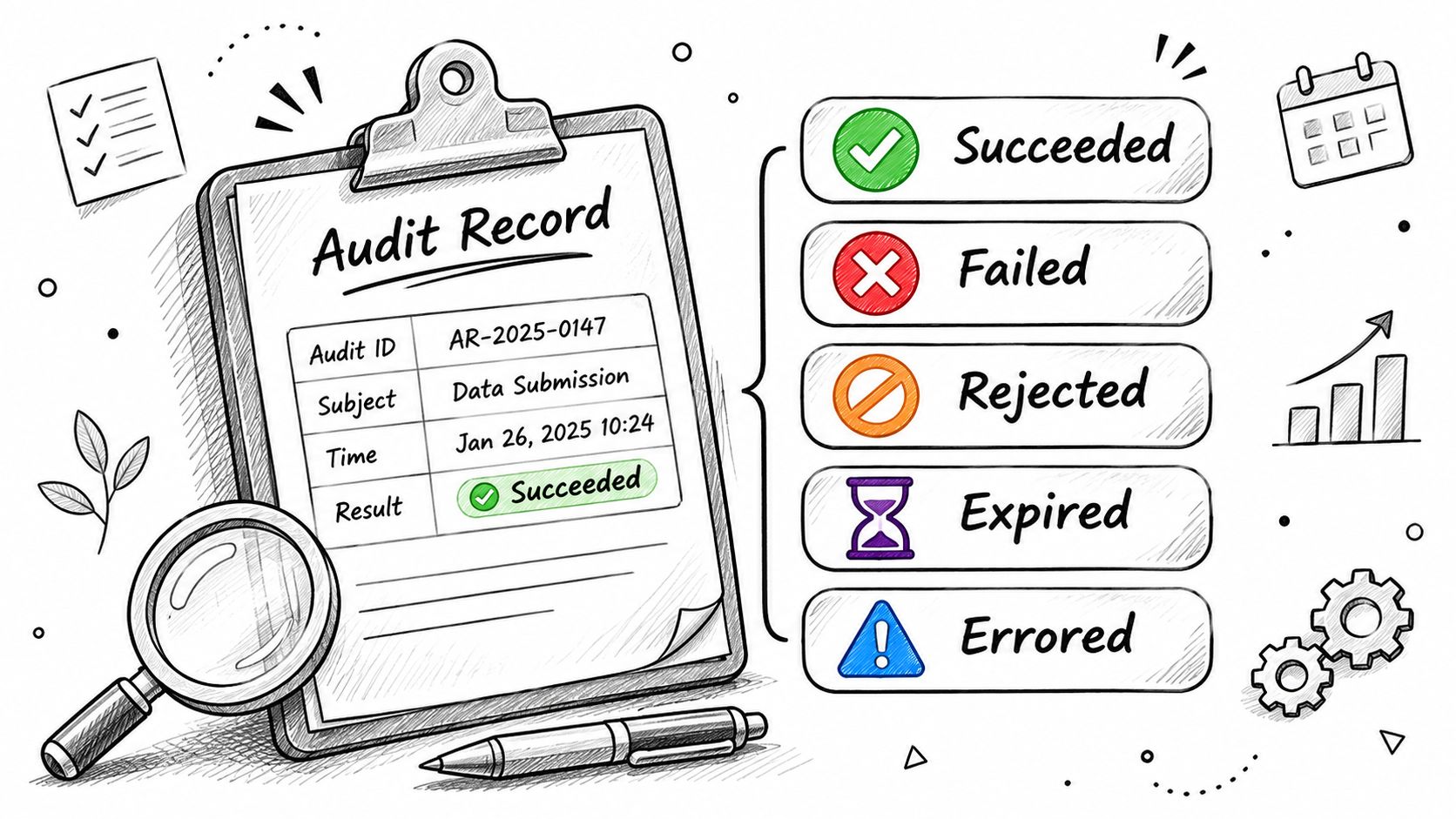
Consider a budget change. The account identifies where it was requested, while the change description shows the value the agent was asked to update. The requester tells you who initiated the task; the confirmation field identifies who approved an action requiring confirmation. The outcome then shows whether the change worked. Each field answers a different question, much like a receipt that records the purchase, the person who placed it, and whether the payment went through.
An outcome marked as unsuccessful is useful evidence too. It tells you the requested change did not work, but the record alone may not explain every condition in the advertising platform or what happened afterward. A record that says a change worked supports that conclusion about the recorded action. It does not, by itself, establish that delivery or spend later matched expectations.
Keep the request and the result distinct. A person can ask for a budget change, another person can confirm it, and the outcome can still show that it did not work. That sequence helps a reviewer distinguish intent, approval, and result instead of treating them as one event. If the outcome is unclear, check the relevant account and platform details before making another change.
The trail has a boundary. It records changes made through AdCrunch, not every action taken directly in an advertising platform or every platform-side adjustment. It can help explain an event within its scope; it cannot prove that no other event occurred, or establish the cause of a later performance change by itself. Logs are most useful when they retain failed attempts as well as completed actions, so the record shows what was tried and what resulted.
Using the Trail in Disputes, Compliance and Postmortems
The trail supports a dispute, a compliance check or a postmortem by showing who acted, who approved and what Meta returned. Each of those three uses leans on a different part of the same record.

Disputes. The record shows who asked for the change, who confirmed it, the old value, the new value and the exact time. It also keeps requests a person rejected or that expired, which never reached Meta at all. That’s often the more useful half of the conversation, because it shows what the account deliberately didn’t do.
Compliance checks. Every change made through AdCrunch carries a record with the team member and the time. An agent can’t confirm its own spend change: only a person signed in to AdCrunch can confirm it, and the record names that person. That separation is what a reviewer is looking for when they ask whether approval was independent. Sarbanes-Oxley put retention on a formal footing in 2002, and the SEC’s rules require firms to keep specified audit records for seven years, documentation that lets a reviewer understand the nature, timing, extent and results of procedures and identify who performed and reviewed the work, as the SEC’s retention rule sets out. An ad account doesn’t fall under that rule, but the shape of the evidence it implies is the same: intent, approval, execution and result in one chain.
Postmortems. A Failed change keeps Meta’s reason and error code, and an Errored change tells you to check Ads Manager instead of claiming an outcome. The record has no expiry date, so the postmortem six months later reads the same as the one that afternoon.
Where the trail is strongest is integrity. AWS CloudTrail offers a working model: each delivered log file gets a SHA-256 hash, an hourly digest records those hashes, and the digest is signed with SHA-256 and RSA so it can be verified with a public key, per AWS’s log file validation documentation. Validation runs backward through the chain and catches modification or deletion of log files, digest files, or both.
The line to hold: the record proves that a named person confirmed a specific change at a specific time. It does not prove why they confirmed it. Anything past that is your inference, and it should be labelled as one.
Governance expectations around this are rising, and not evenly. In 2025, 48% of organizations surveyed by Gradient Flow’s 2025 AI governance survey monitored production AI systems for accuracy, drift and misuse, which means the other half were relying on something else when a change went wrong.
One practical note on the records themselves: they can become a sensitive dataset. AdCrunch doesn’t store customers’ ad account credentials and stores only the OAuth tokens needed to provide the Service, so the trail holds the change history rather than the keys to the account. Treat exports with the same care as the account itself. For teams running many accounts, the workflow around those checks is covered in this guide to large account management process.
Who Uses the Trail and What It Costs
Who needs to read an audit trail, and what should they check before choosing a plan? The 7-day trial includes the whole product, including changes on live campaigns. A customer who cancels during the trial is not billed. Pro costs $99 a month, flat, with unlimited ad accounts and seats. See the AdCrunch pricing page for plan details.

Agencies can use the trail to review changes across client accounts. In-house teams can check what changed without switching between records, while freelance buyers can use it to answer a client’s question with the recorded timeline rather than memory. Each change the agent makes appears on the Activity page with the ad account, what changed, who asked for it, and whether it worked.
Access matters too. Audit records may contain sensitive details about campaign activity, so teams should decide who needs to view or export them. An ad creative tool pricing tiers page is a different kind of pricing reference, and does not establish how audit-trail tools charge for seats or accounts.
Before approving another AI-driven spend change, check the record for that campaign. Compare the recorded change with the budget in Ads Manager, and note who requested it and whether it worked. If the status is Errored, check Ads Manager before making another edit.
AdCrunch’s Activity page records each agent change to a campaign, ad set or ad. Connect an account through Claude, ChatGPT or the Adgent, then review the change in the same place. Start the trial from the AdCrunch pricing page.