
10 Paid Search Management Tools for Teams
Compare 10 paid search management tools for multi-account automation, reporting integrations, pacing, bidding, and campaign operations.
You’re staring at the same problem most paid search teams hit eventually. Performance shifts in Google Ads, Microsoft Advertising, or another engine, budgets need to move before waste piles up, campaign structure has to stay clean, and someone still has to explain what changed across every account. The right paid search management tools don’t all do the same job. Some execute changes, some centralize enterprise workflows, some improve audits or pacing, and some make feed-driven scale possible without turning every launch into a manual rebuild.
This comparison is organized by the operational problem each tool solves, not by how long the feature list looks on a pricing page. That matters because a dashboard that only reports metrics solves a different bottleneck than a platform that can build campaigns, enforce approvals, or sync product feeds at scale. The list below compares execution depth, multi-account handling, automation scope, reporting connectivity, implementation effort, and the limits that show up once real budgets and real teams are involved.
Table of Contents
- 1. AdCrunch
- 2. Google Search Ads 360
- 3. Skai
- 4. MarinOne
- 5. Optmyzr
- 6. Adalysis
- 7. Opteo
- 8. Adspert
- 9. Shape
- 10. Dotidot
- Top 10 Paid Search Tools, Feature Comparison
- Match the Tool to the Bottleneck
1. AdCrunch
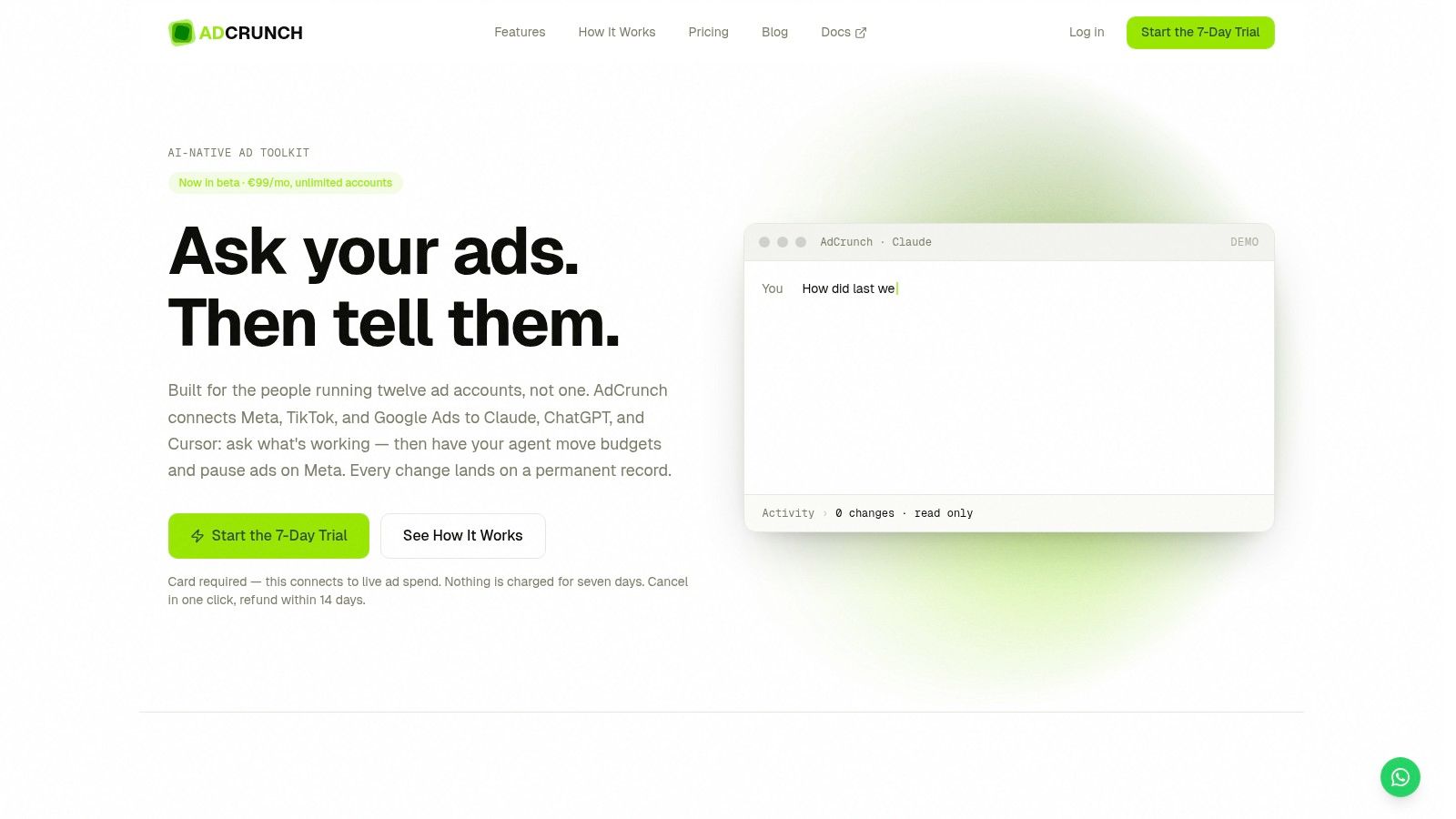
AdCrunch is the clearest fit for teams that want to turn analysis into action across many accounts without paying per seat or per account. It connects Meta, TikTok, and Google Ads through OAuth, then lets teams work through Claude, ChatGPT, a REST API, or the in-console Adgent agent. The result is less “look at the problem” and more “diagnose it, then do something about it.”
Where it solves real execution pain
AdCrunch is built for the gap between insight and remediation. If an account needs budgets shifted, campaigns built, or ads paused, the platform is designed to carry that work server-side while keeping credentials inside AdCrunch and out of LLM prompts. That matters in multi-account operations because the handoff from analyst to media buyer often creates delays, and delays turn into wasted spend.
The governance choices are just as important as the automation. New creations arrive paused, there are no hard-deletes, existing ad set targeting isn’t edited, and there are no bid edits. Every action lands in a permanent Activity log, so teams can trace what changed, who initiated it, and how it ended.
Practical rule: Use automation where the rollback path is clear, and keep the change history visible enough that another operator can audit the decision later.
Who gets the most value
AdCrunch makes the most sense for agencies, freelance buyers, in-house multi-brand teams, and ecommerce groups that manage many accounts with limited headcount. Its flat $99/month Pro price for unlimited ad accounts and unlimited seats removes the scaling friction that usually shows up as teams grow. The trade-off is straightforward, though. It’s in beta, Meta is the only write-enabled network today, and TikTok and Google Ads are read-only for now.
For teams already living in LLM workflows, the appeal is obvious. Campaign Plans, Skills, and Brand rules create a shared operating layer, which is more useful than yet another dashboard if the problem is execution speed with guardrails. AdCrunch is also one of the few tools in this list that directly addresses accountability, not just efficiency.
2. Google Search Ads 360
Google Search Ads 360 makes sense when the problem is orchestration across engines, not isolated optimization inside one ad platform. It centralizes campaign management and reporting across Google Ads, Microsoft Advertising, and other engines, which is exactly what large teams need when structure, permissions, and reporting all have to line up. If your operation already lives in the Google Marketing Platform, SA360 feels less like an extra layer and more like the control plane.
Its strongest advantage is the way it connects search work to the rest of the GMP stack. Floodlight, GA4 360, and DV360 integrations reduce stitching work, which matters when analysts are reconciling performance across systems instead of just reading platform dashboards. The other major benefit is that unified workflows can help enterprise teams keep campaign operations standardized across many accounts.
That said, the value story is clearest when the rest of the stack is already in place. If you’re not using the Google Marketing Platform broadly, SA360 can feel expensive relative to what a narrower tool would solve. The same is true for simpler accounts, where native automation may already cover the basics.
Best fit and trade-off
SA360 is the strongest choice for agencies and in-house teams that need cross-engine governance, pacing control, and enterprise reporting under one roof. It’s less attractive when the account portfolio is small, the media mix is simple, or the team wants a lighter operational footprint.
3. Skai
Skai is built for teams that need paid search to sit beside social and retail media, not apart from them. That broader scope matters when planning, forecasting, and measurement have to happen across channels that influence one another. For brands with serious multi-channel budgets, a unified system is often more useful than a search-only toolkit.
The platform’s appeal is its combination of planning, automation, and cross-channel analytics. Its generative-AI assistance, including Celeste AI, adds another layer for teams that want help with creative and text recommendations without starting from scratch every time. The practical benefit is less about novelty and more about moving from scattered channel-level views to a single operating model.
Skai’s downside is familiar to anyone who has deployed enterprise software. Onboarding takes effort, the contract model is less flexible than smaller tools, and simple setups may not extract enough incremental value to justify the overhead. If native platform automation already does most of the job, Skai can be more system than solution.
If the team needs one place to plan search, social, and retail together, a broader suite beats a point solution. If the bottleneck is only bids or audits, the extra surface area can be overkill.
4. MarinOne
MarinOne suits teams that want independent management across search, social, and ecommerce advertising, plus a strong reporting layer. Its practical value is not just campaign control. It also lets teams move data into external BI and warehouse setups through BI Connect, which matters for teams that do not want reporting locked inside one platform.
It also covers day-to-day automation, audience work, and creative testing. For multi-account operators, that mix helps when media changes have to line up with broader reporting workflows instead of sitting in separate dashboards. If campaign data needs to reach Tableau, Looker, or Data Studio cleanly, MarinOne fits that requirement better than many narrower tools.
Where MarinOne shows its age is in how mature the platform feels. That stability can be useful, but it can also bring legacy workflows, mixed views on product momentum, and a pricing model that usually needs a pilot before approval feels comfortable.
Useful when reporting is not optional
MarinOne works best when the reporting destination matters as much as the management console. If a team needs data egress into a warehouse or BI layer, the tool’s independence becomes a real advantage. If the team only wants fast optimization inside Google Ads, the setup can feel heavier than needed.
See how AdCrunch is positioned against other PPC management tools.
5. Optmyzr
Optmyzr fits operators who live in Google Ads and Microsoft Advertising and need help with audits, bulk changes, rules, and Shopping or Performance Max work. It focuses on daily execution, not on building a broad enterprise layer. For agencies that spend more time inside accounts than in strategy decks, that trade-off makes sense.
The platform is strongest where account work gets repetitive. Rule-based and data-driven recommendations can be applied quickly, audits surface hygiene issues, and the Campaign Automator helps with large-scale builds from feeds. It also supports modern workflow triggers and search term analysis, which gives teams more context than static reporting alone. For readers comparing search-focused tools, AdCrunch’s Google Ads tool review is useful background on the workflow layer Optmyzr sits beside.
Scope is the main limit. Optmyzr stays inside the search workflow, so it does not replace a full omnichannel control plane, and some advanced Performance Max work still needs native access or API work. Smaller accounts can also struggle to justify the cost if they do not use enough of the toolkit.
Optmyzr speeds up the judgment operators already apply, while leaving the final call in their hands.
6. Adalysis
Adalysis is strongest where many teams are weakest, routine account health checks and ad testing. It focuses on automated audits, RSA testing, quality score analysis, and root-cause diagnosis for Google Ads and Microsoft Advertising. If your team already has strategy but struggles to maintain hygiene across many accounts, this is a good fit.
The platform’s always-on diagnostics are the main draw. They help surface problems early, which is useful for agencies that manage a lot of smaller accounts and can’t afford to manually inspect everything each week. Bulk ad creation and multi-ad-group testing also help teams move faster without losing QA discipline.
Adalysis does not try to be an all-in-one enterprise orchestration suite. That narrowness is part of the appeal, because it keeps the product focused on testing and audit depth rather than spreading into every possible paid media task. The downside is that bidding automation is not as deep as in some other tools.
When it beats broader suites
Use Adalysis when the bottleneck is account hygiene and test management, not cross-channel governance. It’s the kind of tool that earns its place by catching problems early and giving operators a cleaner account to work from.
7. Opteo
Opteo fits freelancers and smaller agencies that spend most of their time in Google Ads. It offers continuous monitoring, prioritized optimization suggestions, budget tracking, and experiment builders without forcing users into an enterprise stack. It fits teams whose need is guidance rather than orchestration.
The value is in the workflow. Opteo surfaces recommendations and keeps the path from alert to action short, so operators can review issues and move on with less overhead. For lean teams, that can be easier to maintain than a tool that expects constant setup and oversight.
The trade-off is scope. Opteo is Google Ads only, so teams that also manage Microsoft Advertising or broader execution will need another platform. It is also a weaker fit for heavily customized, script-driven programs, where the operator needs more control than a guided assistant usually gives.
For a small agency that wants a clean daily review process, that restraint is the point.
8. Adspert
Adspert fits teams that need bid and budget optimization around ROAS or COS without hand-managing every change. It supports Google Ads and Microsoft Advertising, so it covers the search engines many account managers still rely on. The tool matters most when the bottleneck is bidding discipline, not campaign architecture.
Its keyword harvesting and automated additions help widen coverage with less manual review. The practical upside is that it ties spend control to performance impact, which makes the case easier for resource-constrained teams that want to outsource a narrow function.
Breadth is what you give up. Adspert covers bidding and leaves audits, creative testing, and reporting layers to other tools. That makes it a specialist layer, not a full operating system.
For teams comparing the automation angle AdCrunch contrasts with in PPC operations, Adspert sits on the execution side of the stack, where bid control and budget discipline matter more than broader workflow coverage.
9. Shape
Shape is built for pacing, budget governance, and spend control across PPC portfolios. It fits the point where monthly budgets are too many to monitor reliably by hand, and the main question is whether spend will stay aligned with targets. The platform predicts spend and goal attainment, then gives teams time to adjust before a budget slips off course.
That matters for agencies and multi-account teams that need explainable pacing. Shape works alongside native consoles or other management layers, which is a practical setup for budget control. In day-to-day work, it helps prevent overspend and underspend before either one turns into a client issue.
The trade-off is focus. Shape is not built for creative testing or keyword management, and connector coverage can vary by setup. Pricing also requires a sales conversation, so the buying process is less transparent than with self-serve tools.
Where Shape belongs in the stack
Use Shape when budget accuracy is the bottleneck and campaign execution is already handled elsewhere. Shape governs spend while your existing console or management layer handles creative and keyword execution.
10. Dotidot
Dotidot, formerly PPC Bee, suits catalog-heavy ecommerce teams. It builds and syncs search, DSA, Shopping, Display, and Performance Max structures from feeds and business data, which helps when large catalogs change often. For accounts with thousands of moving products, feed-driven automation is often the practical way to keep campaigns current.
Its strength is structural scale. Dotidot can generate campaigns, ad groups, and ads from feeds and variables, then keep them aligned across Google Ads and Microsoft Ads. That cuts repetitive work when catalog updates, pricing changes, and inventory shifts hit at the same time.
Dotidot falters outside catalog-driven accounts. Pure keyword-led B2B programs get little from feed logic. The platform also takes time to learn, especially for teams building advanced automations or working with several data sources.
If product data drives the account, Dotidot earns its place. If manual keyword strategy drives performance, the tool can feel too specialized.
Top 10 Paid Search Tools, Feature Comparison
| Product | Core features ✨ | Experience & quality ★ | Pricing & value 💰 | Ideal users 👥 | Standout / USP |
|---|---|---|---|---|---|
| AdCrunch 🏆 | ✨ OAuth Meta/TikTok/Google; Meta write actions; LLM connectors; permanent Activity log | ★★★★☆, Fast onboarding; strong governance | 💰 $99/mo Pro flat, unlimited accounts & seats; Enterprise options | 👥 Agencies, multi-brand in-house teams, media buyers | 🏆 Agent-driven write actions + flat org pricing; paused creations & immutable audit |
| Google Search Ads 360 (SA360) | ✨ Cross-engine campaign mgmt; automated pacing & bids; GMP integrations | ★★★★☆, Enterprise-grade reliability | 💰 % of media, can be expensive at scale | 👥 Large enterprises & GMP-stack agencies | Deep native GMP integrations; cross-engine automation |
| Skai (Kenshoo) | ✨ Cross-channel planning, forecasting, Celeste generative AI | ★★★★☆, Robust enterprise tooling | 💰 Contract pricing, enterprise-focused | 👥 Brands & agencies needing omnichannel scale | Broad channel coverage + AI-driven planning |
| MarinOne | ✨ Cross-channel workflows; audience tools; BI connectors | ★★★★, Mature platform, enterprise support | 💰 Custom pricing; pilot often recommended | 👥 Teams needing independent tooling & BI exports | Strong data egress + Established cross-channel feature set |
| Optmyzr | ✨ Rule engines, bulk tools, Campaign Automator, audits | ★★★★☆, Practitioner-friendly, active updates | 💰 Mid-tier SaaS pricing; ROI for agencies | 👥 Agencies and practitioners focused on optimization | Time-saving bulk tools and one-click applies |
| Adalysis | ✨ Continuous diagnostics; RSA/ad testing; root-cause analysis | ★★★★, Deep audit & QA focus | 💰 Scales by ad spend; multi-account tiers | 👥 Agencies managing many smaller accounts | Always-on audits and multi-ad-group testing |
| Opteo | ✨ Prioritized suggestions; experiment builders; alerts | ★★★☆☆, Lightweight, easy adoption | 💰 Fair-value for small teams | 👥 Freelancers & small agencies (Google Ads) | Opinionated Google Ads assistant with guided recommendations |
| Adspert | ✨ Goal-driven bidding (ROAS/COS); keyword harvesting | ★★★☆☆, Focused bidding performance | 💰 Performance-linked fees (aligned to impact) | 👥 Advertisers wanting hands-off bid management | Fee model ties cost to optimization outcome |
| Shape | ✨ Predictive Budget Pacer; centralized governance & alerts | ★★★☆☆, Explainable pacing for agencies | 💰 Contact sales, enterprise pricing | 👥 Agencies managing many monthly budgets | Purpose-built pacing/governance layer to reduce overspend |
| Dotidot (PPC Bee) | ✨ Feed-driven campaign generation & sync; data enrichment | ★★★★☆, Scales well for catalogs | 💰 Plan-based; unlimited users per plan | 👥 Ecommerce advertisers with large catalogs | Automated feed-to-campaign scale and sync |
Match the Tool to the Bottleneck
The fastest way to choose a paid search management tool is to start with the bottleneck, not the brand. If your problem is enterprise governance across multiple engines, a platform like Google Search Ads 360 or Skai is a stronger fit because both are built for cross-channel or cross-engine orchestration. If need is broad independent planning and reporting, MarinOne and Skai make more sense than a narrow point solution because they sit higher in the stack and help centralize measurement.
If the bottleneck is more specific, a specialist usually wins. Optmyzr is a strong fit for audits, bulk work, and search-side optimization. Adalysis is better when account health and ad testing are the core issue. Adspert belongs in conversations about bidding and budget automation. Shape is the right answer when pacing and budget governance are the main headache. Dotidot is the clear choice when feed maintenance and ecommerce scale are the problem.
AdCrunch sits in a different lane. It’s the best match when the team wants agent-assisted operations across many accounts with controlled Meta write access, a permanent activity log, and a workflow that turns diagnosis into execution instead of stopping at reporting. That combination matters for agencies and in-house teams that need speed without losing traceability. It also matters when the team wants to use LLMs as part of the operating model, not just as a reporting interface.
Before you commit, validate connector coverage, permissions, data quality, reporting destinations, pricing basis, onboarding effort, and rollback or approval controls. Then run a focused pilot on representative accounts with predefined success criteria. A feature checklist won’t tell you whether the tool fits your actual workflow, but a live pilot will show you whether it really removes the bottleneck you’re paying to solve.
If you want a tool that connects ad accounts to AI agents and helps teams move from diagnosis to execution, AdCrunch is built for that workflow. It gives multi-account teams a governed way to act on Meta today, while keeping a permanent activity log for accountability. Visit it if you want to see how agent-assisted paid search management can work in practice.