
AI Agent for Marketing: What It Does and How Teams Use It
Learn how an AI agent for marketing works, from LLM connectors and API execution to trust, safety, and the day-to-day tasks it handles for teams.
Most media buyers have lived this morning. Slack is already full of client questions, Meta has one campaign pacing too fast, TikTok has a creative that slipped into fatigue, and Google Ads needs a search-term cleanup before lunch. The problem isn’t a lack of reporting. It’s the gap between seeing what changed and changing it.
An AI agent for marketing sits in that gap. It watches account data, decides what matters, and writes changes back into the ad stack instead of leaving the human to translate every insight into another manual action. That shift matters because marketing teams have already moved well past casual AI use, with 65% of organizations regularly using generative AI in at least one business function in 2024, up from 33% in 2023, and marketing and sales saw the biggest increase in that jump according to McKinsey’s survey summary in the benchmark brief. Later industry reporting around Salesforce’s marketing data shows the move from generic AI usage toward recurring workflows and autonomous execution, with 87% of marketers using generative AI in at least one recurring workflow in Q1 2026, up from 51% in Q1 2024, and enterprise teams running autonomous agents reaching 34% in Q1 2026. Those are signs that marketing has become one of the clearest places where AI stops being a novelty and starts acting like an operational worker.
Table of Contents
- What a Marketing Team Actually Needs From an AI Agent
- How an AI Agent for Marketing Works Under the Hood
- Connectors and API Execution in Plain English
- Trust, Safety, and Audit Patterns That Keep Spend Safe
- Day to Day Tasks an AI Agent Handles Across Meta, TikTok, and Google
- How Agents Differ From Dashboards and Reporting Tools
- Choosing the Right AI Agent for Your Marketing Stack
What a Marketing Team Actually Needs From an AI Agent
A buyer doesn’t wake up wanting another chart. They want the paused ad set to flip back on, the budget to move off the weak cohort, and the report to explain what happened without forcing them to click through fifteen tabs first. That’s the job of an AI agent for marketing, it closes the distance between diagnosis and action.
The pain is operational, not conceptual
Teams already know how to spot problems. They can see spend spikes, CTR dips, and a creative that has gone stale. What slows them down is the work around the insight, matching naming conventions across platforms, checking whether a change belongs in Meta or TikTok first, and repeating the same routine edits account after account.
That’s why an agent is different from a dashboard. A dashboard tells you the problem. An agent can look at the same issue and do something about it, like moving budget from one ad set to another, pausing a losing ad, or queueing a status change for review. In multi-account work, that’s the difference between a team that’s reactive and a team that keeps pace with the account.
The agent becomes the bridge between screen and ship
Think of the agent as an operational layer that sits above Meta Ads Manager, TikTok Ads Manager, and Google Ads. It watches for pacing anomalies, creative fatigue signals, and underperforming segments, then it writes back to the platform once the rules allow it. The human still sets policy, but the agent handles the repeatable motion.
Practical rule: if the work is repetitive, high-volume, and easy to verify after the fact, it’s a strong candidate for agentic execution.
That’s the core promise here. Not creative magic. Not copy generation alone. The agent does the glue work that usually burns time in the middle of the day, the kind that keeps campaigns alive while the team is still talking about what to change. The rest of this article unpacks the moving parts that make that Monday morning possible.
How an AI Agent for Marketing Works Under the Hood
A useful way to understand agent architecture is to think like a kitchen manager. The ad platforms are the pantry, the recipes are the rules, and the AI agent for marketing is the team member who can read the order, check the ingredients, and send the right dishes out without asking for a new meeting every time.
The reasoning brain, the connector hands, and the guardrails
The first layer is the reasoning brain, usually an LLM. It reads the request, weighs the context, and drafts a plan. If you tell it to rebalance spend toward the ad set with the lowest CPA in the last three hours, it doesn’t just “understand” the sentence, it turns it into a sequence of machine-readable steps.
The second layer is the connector hands. These are the OAuth-linked integrations that reach into Meta, TikTok, and Google Ads. They read performance, pull entity structure, and send write calls back to the platforms when the agent is allowed to act. Without this layer, the agent can talk about campaigns but can’t touch them.
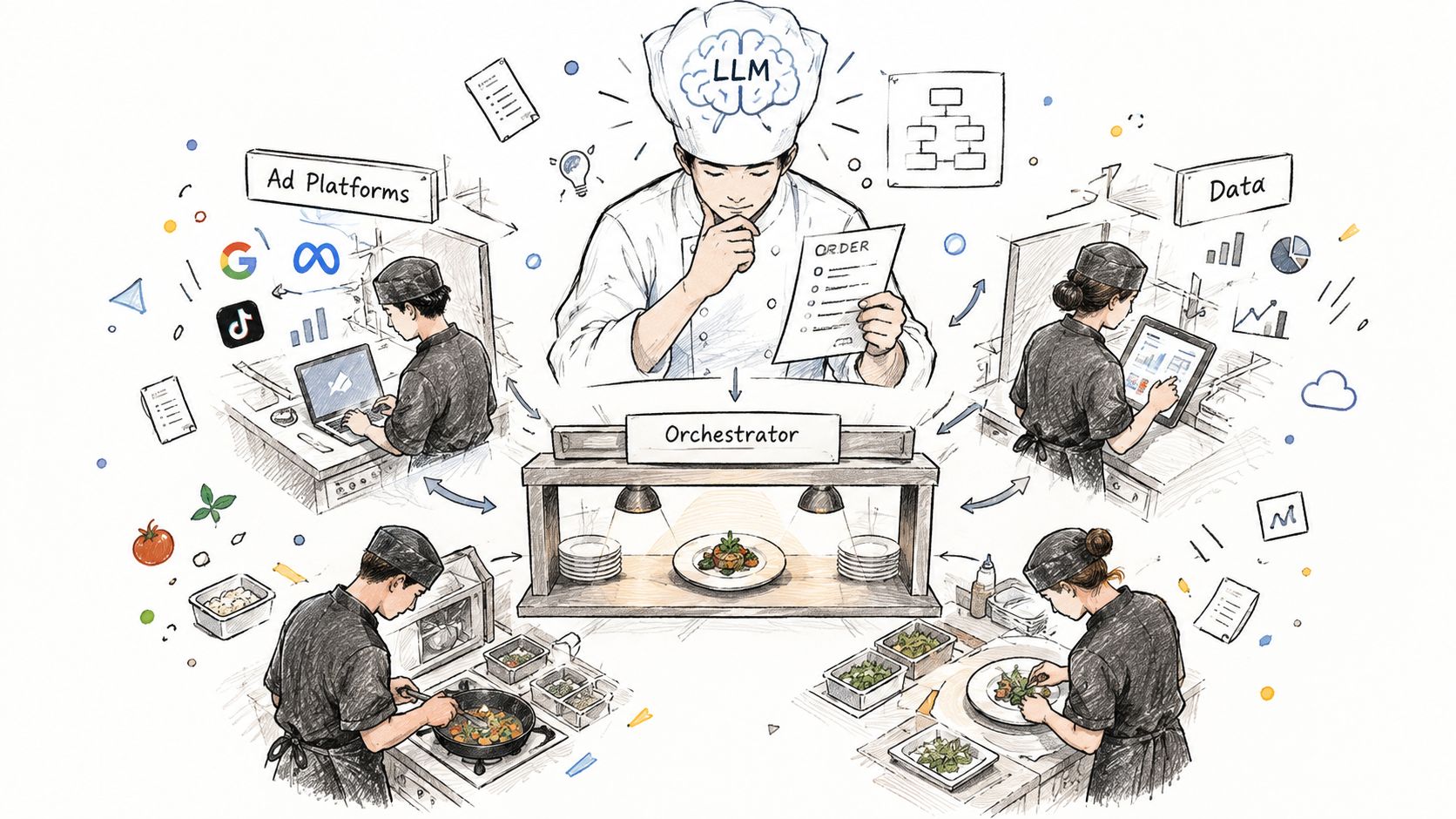
The third layer is policy guardrails. These are the limits that keep a smart system from doing something dumb in a live account, approval thresholds, scope restrictions, dry-run modes, and kill switches. In practice, the agent should know what it can read, what it can write, and when a human has to step in before any spend moves.
A request becomes a plan, then a write sequence
Here’s the simplest way to picture the flow. A marketer writes a prompt. The agent interprets intent, checks account data, and creates a structured plan with the exact changes it wants to make. That plan is reviewed against policy, then dispatched as a queue of API calls, each one logged so the team can replay what happened later.
The point isn’t to make the model “more intelligent.” The point is to make the workflow safer, testable, and reversible.
The YouTube workshop below is useful if you want to see how teams talk about this in practice, because the architecture only makes sense when you connect it to the work.
Connectors and API Execution in Plain English
A connector is not just a “sync.” It’s the plumbing that lets an agent act inside a platform with permission and traceability. In paid media, that means the system can read account structure, inspect performance, and, where allowed, mutate campaigns, budgets, statuses, and creatives through platform APIs.
What the connector layer actually touches
The first step is the OAuth handshake. That’s the authorization step where the system gets permission to act on behalf of a user or system account, with scopes that determine whether it can only read or can also write. In a marketing stack, that boundary matters more than many realize, because read access is harmless until the same connection can pause an ad set or alter a budget.
From there, the connector talks to surfaces such as campaign read endpoints, insights endpoints, budget update endpoints, status endpoints, and creative asset endpoints. In plain English, that means it can inspect structure, pull performance, and, if the scope allows it, send changes back. The agent is only as capable as the permissions behind the connector.
A structured plan is safer than a free-form instruction
A natural-language request gets converted into a structured plan, usually a JSON payload with typed actions. That plan can include fields like account_id, entity_type, action, before_state, after_state, and rollback_token. The system is no longer “guessing” what the request means. It is executing a list of declared operations.
| Layer | What It Does | Real Surfaces Touched |
|---|---|---|
| OAuth connection | Grants read or write permission with scoped access | User or service account authorization |
| Read layer | Pulls campaign structure and performance data | Campaign endpoints, insights endpoints |
| Plan layer | Converts the prompt into typed operations | Structured JSON, change queue |
| Write layer | Sends approved changes back to platforms | Budget, status, and creative endpoints |
| Audit layer | Stores what changed and why | Execution log, rollback record |
When the plan is staged, the system can dry-run it against sandbox data, then hold or approve it depending on guardrail thresholds. Only after that does it dispatch sequential API calls with retries and idempotency keys, so duplicate writes don’t create messes. The result is an execution log the team can inspect later, which is the difference between “the agent did something” and “we can prove what it did.”
Trust, Safety, and Audit Patterns That Keep Spend Safe
A team’s first bad automation story usually starts with a small mistake. Someone gives a tool too much scope, a bulk action hits the wrong entity, and a campaign that shouldn’t have moved gets touched anyway. That’s why governance isn’t a side topic for an AI agent for marketing, it’s the operating system.
Two stories, two very different outcomes
In the first case, a media buyer notices that one ad set is lagging. In a dashboard-only workflow, they make a note, ping a teammate, and wait for someone to open the account and move the budget. Nothing is wrong with the insight. The delay is the issue.
In the second case, the agent spots the same issue, generates a plan, checks the policy rules, and proposes the change in a controlled queue. If the change sits below the approval threshold, it can write back automatically. If it crosses the line, the human approves it before anything ships. The buyer still controls spend, but the agent removes the lag.
The guardrails that matter in live accounts
The safest systems combine scoped access with staged execution. That means the agent only has permission for specific ad accounts, the plan is reviewed against policy, and the final write only happens after validation. It also means the system should keep daily action limits, a kill switch, and immutable logs that capture who requested the change, what changed, and what reasoning led there.
For teams building this muscle, the practical question is not “can it automate?” It’s “what happens when it is wrong?” That’s why auditability matters so much, especially if the agent can pause entities, move budget, or launch paused ads. If you want a deeper look at how Meta-side automation is usually framed, see the discussion at AdCrunch’s Meta Ads automation overview.
A safe agent doesn’t hide its behavior. It leaves a trail a human can inspect, replay, and reverse.
The risk surfaces are predictable. Bulk pauses can wipe out volume, runaway reallocation can starve a working segment, and unauthorized creative edits can create brand or compliance issues. The guardrail should map directly to the risk, not sit somewhere vague in a product promise. That’s what separates controlled execution from agent sprawl.
Day to Day Tasks an AI Agent Handles Across Meta, TikTok, and Google
The useful tasks are the boring ones. They happen every day, they don’t need original thinking, and they’re expensive when handled manually. An AI agent for marketing earns its place because it can loop through read, decide, write, and log faster than a human can manage across three browser tabs.
What changes by platform
On Meta, the agent can rebalance CBO budgets, rotate creative in Advantage+ workflows, and auto-pause ad sets that are falling under a floor you’ve defined. On TikTok, it can monitor pacing against hourly CPA, keep Spark Ads organized, and swap out creatives that show fatigue. On Google Ads, it can turn search-term review into negation work, test RSA headlines, and refine asset groups in Performance Max.
The key point is not that all of this should happen without review. It’s that the workload is naturally structured as a loop. The agent reads performance signals, applies a rule, queues a write, and records the action. Human sign-off still belongs on higher-risk moves, but the routine work no longer has to wait for someone to remember it after lunch.
| Platform | Task | Trigger Signal | Agent Write Action |
|---|---|---|---|
| Meta | CBO budget rebalancing | One ad set trails the others on cost efficiency | Move budget toward the stronger set |
| Meta | Pausing weak ad sets | A performance floor is breached | Pause the underperformer |
| TikTok | Creative fatigue handling | A creative starts to flatten or lose efficiency | Swap in a fresh asset |
| TikTok | Daily pacing checks | Spend is outrunning the plan | Reduce pace or flag for review |
| Google Ads | Search term cleanup | Irrelevant queries keep surfacing | Add negatives |
| Google Ads | RSA testing | Headline variants need rotation | Adjust the active mix |
For teams comparing tools, the question is whether the platform can act inside the native workflow instead of just surfacing it. A reporting layer can tell you what happened. An agent can carry the operational follow-through.
How Agents Differ From Dashboards and Reporting Tools
Dashboards are still useful, but they solve a different problem. They help you see, summarize, and explain. An AI agent for marketing is built to read the same data and then do the next step, which is why the two tools should not be treated as substitutes.
The difference is the direction of work
A dashboard is mostly read-only. It pulls data into charts, tables, and narratives so humans can decide what to do. An agent is read-and-write. It can inspect the same signals and then act, often inside the same workflow that detected the issue.
That changes the time horizon. A dashboard usually waits until the next report cycle, then asks a person to open the account. An agent can make the change while the issue is still live, which matters in fast-moving media buying where pacing, creative fatigue, and spend drift can snowball quickly.
| Dimension | Dashboard / Reporting Tool | AI Agent for Marketing |
|---|---|---|
| Data direction | Read-only | Read and write |
| Action speed | Next report or manual follow-up | Same workflow, often same hour |
| Accountability | Charts and exported reports | Logged execution plans and write history |
| Best use | Exploration and storytelling | Operational follow-through |
| Pricing model | Usually seat-based | Often tied to action scope or platform usage |
Where dashboards still win
Dashboards are better for exploration. They help when a director needs a story for a weekly meeting or when a buyer wants to inspect trends before changing policy. They’re also easier to use when the core need is explanation, not execution.
The gap closes when the agent gets a richer reporting layer, because then the same system can answer questions and take action without forcing the user to switch tools. That’s where agentic execution beats passive reporting in Meta, TikTok, and Google Ads workflows, especially when the account manager is already looking at the same issue twice a day. If you want a broader automation contrast, the discussion at AdCrunch’s AI marketing automation guide fits that comparison well.
Choosing the Right AI Agent for Your Marketing Stack
A demo can hide a lot. An agent might look sharp in a sandbox, then fail the moment it has to map cleanly onto Meta’s campaign hierarchy, TikTok’s split testing workflow, or a Google Ads MCC structure. That’s the failure mode that hurts multi-account teams most, not bad language generation, but weak stack fit.
Use stack fit as the first filter
Start with native platform depth. If the product only wraps a generic LLM around chat, it’ll struggle once you ask it to read structure, make changes, and respect the platform’s real rules. A serious agent should understand the data model of each ad network, not just the words in the prompt.
Next, look at the connector layer. Ask which accounts it can access, what scopes it needs, and whether it supports both read and write paths. If the connector can’t separate those cleanly, your control surface will stay fuzzy.
Then check the approval model. Can you set checkpoints for high-risk actions? Can you define which changes require human review and which ones can run automatically? If not, the product may still be useful, but it’s not ready for live operations in a multi-account environment.
Don’t ignore observability and pricing
The best agents leave behind structured logs, change diffs, and exportable audit trails. If you can’t explain why an ad set was paused, you probably can’t defend the system to finance, legal, or the client. Sandbox support matters for the same reason, because teams need a place to test before they trust the agent with live spend.
Pricing deserves a hard look too. Models tied only to seats can punish collaboration, while action-based or spend-linked models can make the cost picture clearer for operations teams. One option in this space is AdCrunch, which connects Meta, TikTok, and Google Ads to AI agents and records each change in a permanent activity log, so the operational side stays visible. That kind of structure is the right reference point when you’re comparing tools, not the size of the marketing pitch.
If a vendor can’t show the “why” behind a change, it’s not ready to manage the “what.”
Two fast disqualifiers help a lot. Skip agents that can’t explain why they paused an ad set, and skip platforms without sandbox environments. Those gaps usually show up later as governance problems, and by then the cost is already on your media account.
If you’re building an operational AI layer for paid media, AdCrunch gives you a practical model for how live account actions, permissions, and audit trails can fit together across Meta, TikTok, and Google Ads. Visit AdCrunch to see how an agent can query performance, write back changes, and keep every action traceable while your team works.